Send the quote. Get it signed. Bill it in stages.
Your client opens the quote on any phone, confirms with a code sent to their email, and accepts. TimeLeaf keeps the proof, invoices the deposit, and turns the rest into invoices, with the hours your crew works at the job site counted once.
Part of Client Invoicing: $49/month flat on every plan from Professional up.
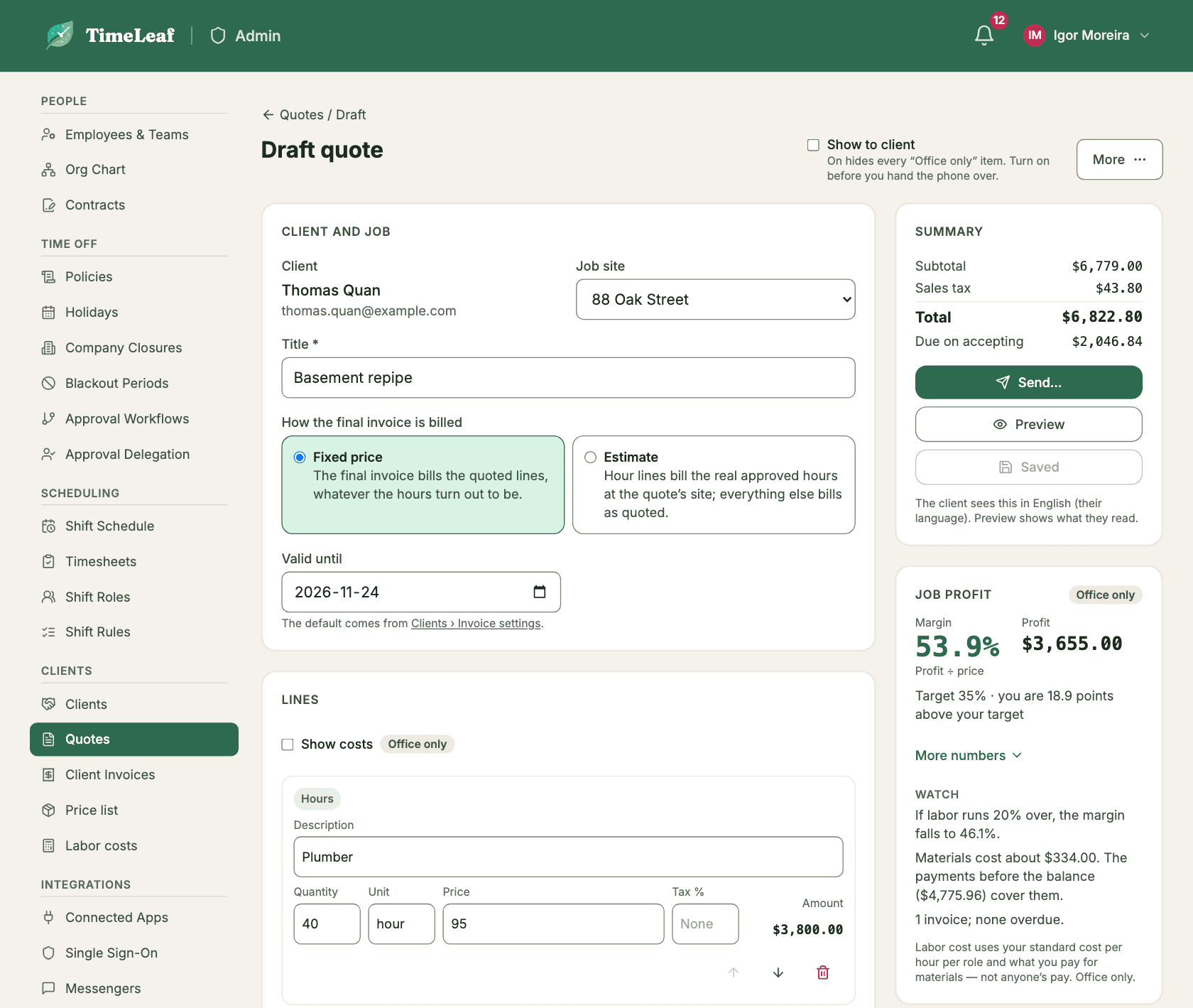
Three places a job quietly loses money.
The quote is a Word file
It goes out as an attachment, comes back as “looks good” in a text, and three weeks later nobody can say which version the client agreed to.
The deposit is chased by text
You agree on 30% down, then spend a week asking for it while the crew is already ordering material.
The hours get billed twice
The same hours end up in the quote and on a weekly invoice, and you find out when the client calls.
From quote to paid, in six steps.
Write the quote
Pick hours by role, services, materials or a mix from your price list. Set a valid-until date, add your terms and choose a payment plan. Totals and each payment’s exact amount update as you type.
Send it
Confirm the client’s email and send. They get the quote as a link and a PDF (or just a link, if you ask for a code to open it), and you are told when they first open it.
The client accepts with a code
They tap Accept, ask for a 6-digit code that goes to their email, type their name, tick the terms and accept. No account, no app. They can also decline or ask for changes.
Invoice the deposit
If the plan has a payment on acceptance, its invoice is issued at once and the client can pay from the quote page: card or wallet through Stripe, Apple Pay and Google Pay where enabled, paid directly to your account. Or they pay the way you usually get paid.
Bill the stages
Payments on set dates arrive as drafts for you to review that day. Payments at stages wait until you bill them. Apart from the payment on acceptance, nothing goes out without a person checking it.
Finish with one invoice
The final invoice shows the whole job and subtracts the payments already invoiced, automatically. Review it, issue it, done.
Choose how the last invoice is worked out.
You set it on each quote. Either way, earlier payments are subtracted automatically.
Fixed price
The final invoice bills the quoted lines. The hours your crew works at that job site are covered by the price, not billed on top.
Example, before tax: a $4,800 bathroom re-pipe. 30% down ($1,440), $1,920 when the rough-in is done, and the remaining $1,440 on the final invoice.
Estimate
Hour lines bill the real approved hours at the job site, at the rate you quoted for each role. Everything else bills as quoted. Before you issue, you see quoted against worked hours per role. An estimate needs a job site, so the hours can be matched.
Example: a home-care agency quotes six weeks of daily aide visits. The final invoice bills the visits actually worked and approved, less the deposit.
Either way, TimeLeaf is built so an hour is not billed twice. Once a quote is accepted, the hours at its job site are held for the quote’s invoices. Hours already on a draft or an invoice at that moment stay where they are, and TimeLeaf lists them for you.
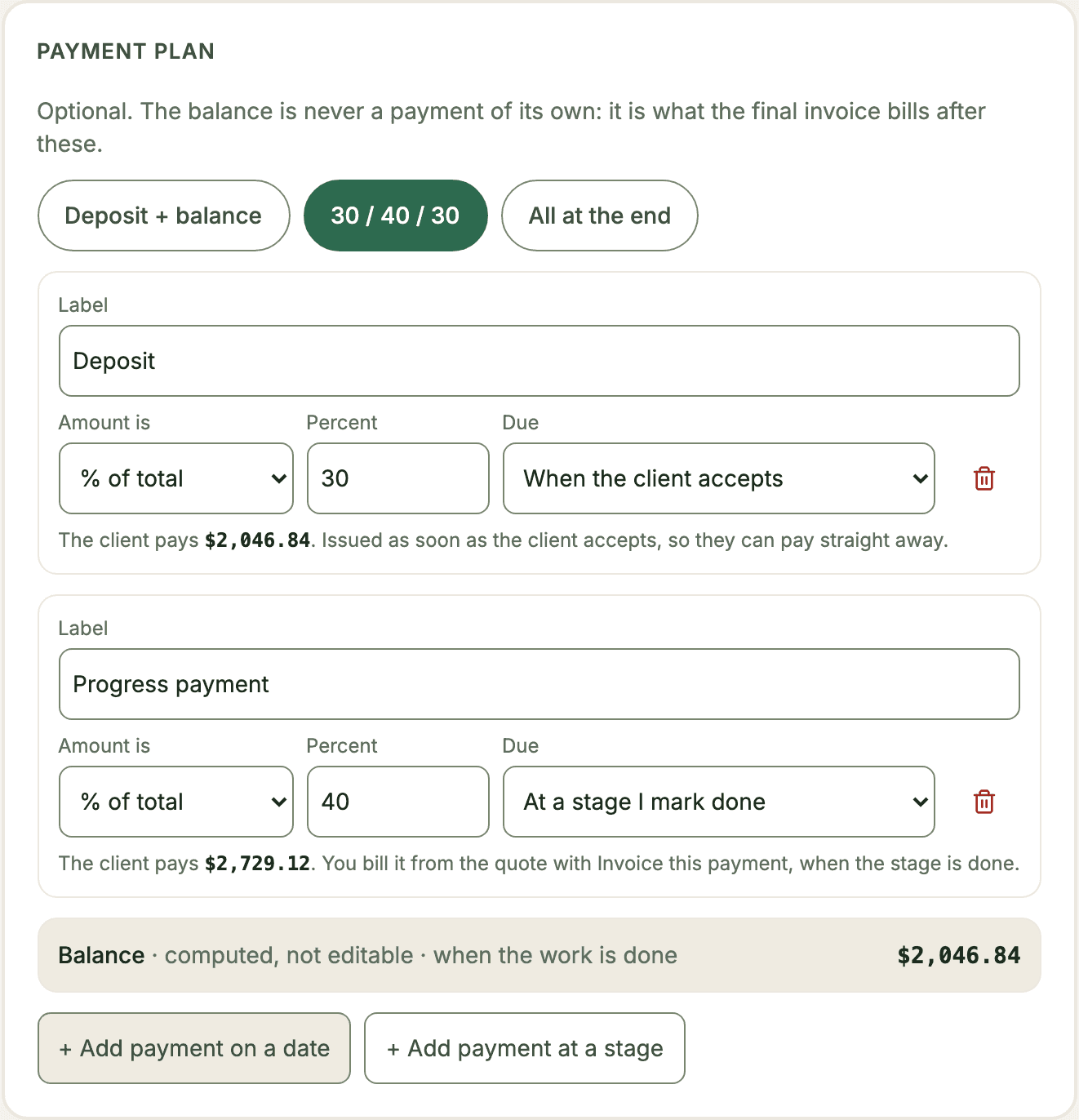
Get paid when the job moves, not when you remember.
Every quote can have a plan of its own. Each payment is a percent of the total or a fixed amount, and the client sees the exact figure and when it is due before they accept.
- A payment on acceptance, issued the moment the client accepts
- Payments on set dates, drafted for your review on the day
- Payments at stages you mark done, such as rough-in or final fix
- Any mix of the three, or no plan at all: everything at the end
- The balance is always what is left, on the final invoice
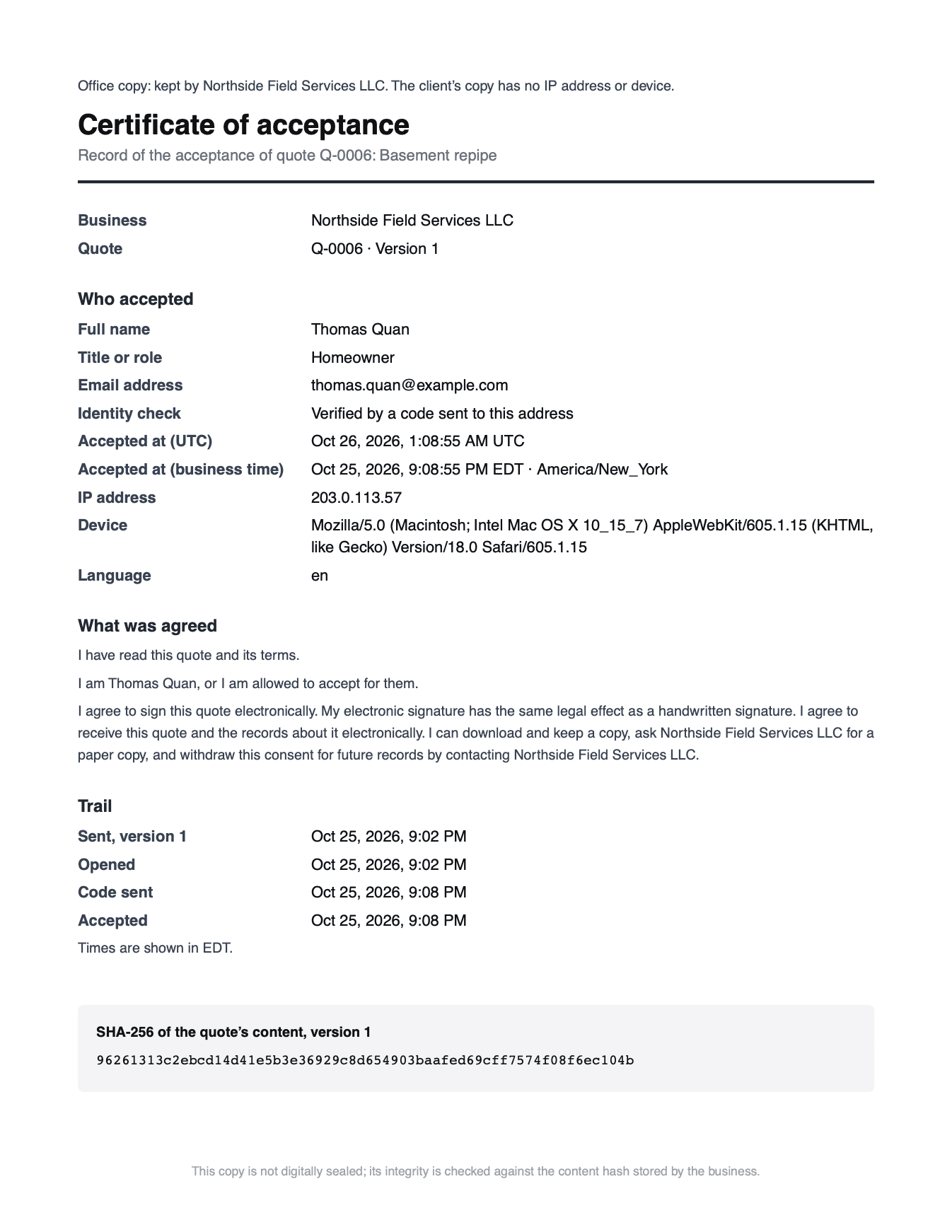
Who accepted what, and when.
Every send saves the exact version the client saw, with a fingerprint of its text. Accepting records the evidence below, and the quote can no longer be edited. It is a binding e-signature with a full audit trail.
- The exact version, and a fingerprint (hash) of its text
- The code check: the email address it went to and when it was confirmed
- The signer’s name and title, the time, the IP address and the device
- The consent text they saw, in the language they saw it
- A trail of every send, view, decline, question and revision
- A PDF of the accepted quote with a certificate page, emailed to the client (their copy leaves out the IP address and device) and kept for you to download
Your own terms set the client’s cancellation rights. State them on the quote.
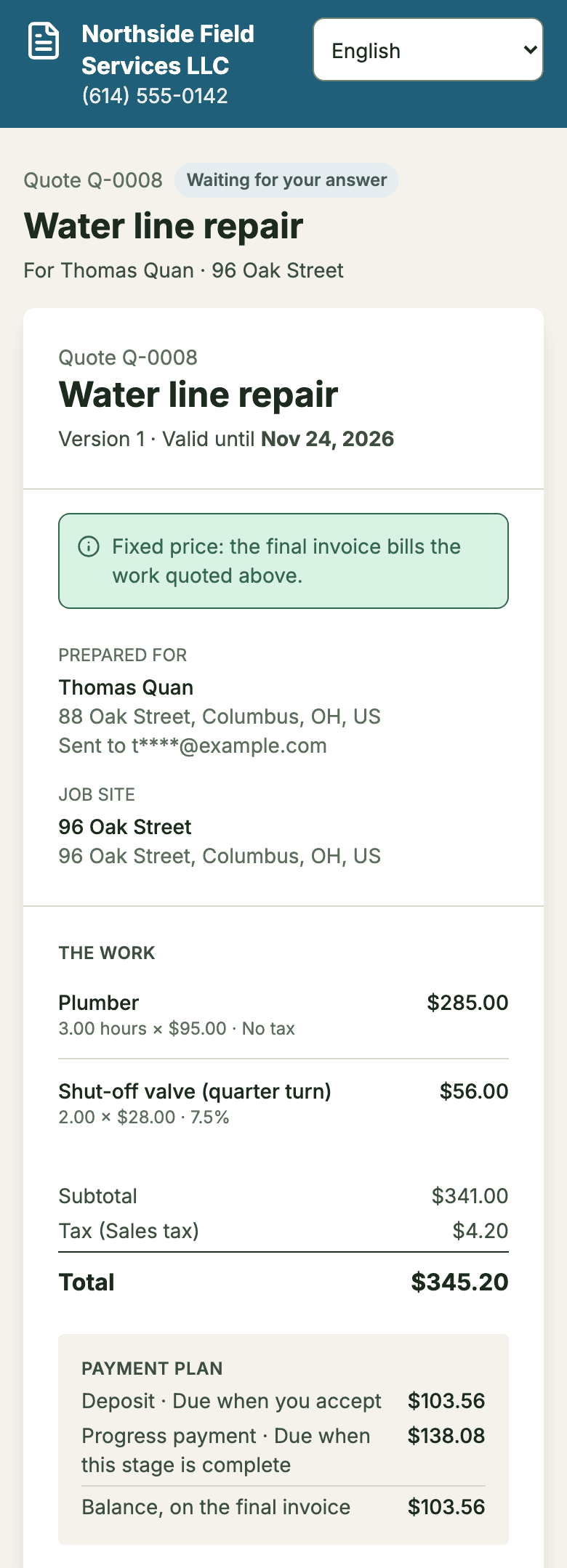
The client reads it in theirs.
Set a language on each client: English, Spanish, Portuguese (Brazil) or French (Quebec). The quote page, the emails, the PDF labels and the consent text follow it, and the client can switch on the page. What you wrote, such as line descriptions, notes and terms, prints as you typed it.
- The language the client actually used is recorded with their acceptance
- Selling in Quebec? If a client’s billing address is in Quebec and their language isn’t French, you get a warning before you send.
Let the office run it without making them admins.
Give the Billing role to whoever looks after your office or your books. They write and send quotes and run invoices, clients and the price list. Admins and owners can do everything the role can.
- Quotes, invoices, clients and the price list
- No access to settings, people or payment setup
- Granted and removed by an admin from People › Employees
Straight answers.
Is the e-signature binding?
The client accepts with a code sent to their email, types their name and ticks their consent, and TimeLeaf keeps the evidence: the exact quote, the code check, name, time, IP address and device, and the consent text shown. That is a binding e-signature with a full audit trail: proof of who accepted what and when. Cancellation rights are set by your own terms and the rules where you work, so state them on the quote. Whether a signed quote holds in a dispute depends on its terms and the law where you work; TimeLeaf does not give legal advice.
Does my client need an account or an app?
No. They open the link on any device and confirm with a code sent to their email. The code goes only to the address you sent the quote to, so a forwarded link alone is not enough to accept.
What if the client wants changes?
They can decline, or send you a question or a change request from the quote page. You revise the quote and send a new version; they accept the new one, and the earlier version stays on record. An accepted quote can no longer be edited.
How does the client pay the deposit?
If your plan has a payment on acceptance, the client pays it from the quote page, right after accepting: card or wallet through Stripe, Apple Pay and Google Pay where enabled, paid directly to your account. If Stripe isn’t connected, the page shows your payment instructions instead.
Will my crew’s hours be billed twice?
TimeLeaf is built to stop that. Once the quote is accepted, the hours at its job site are held for its invoices: on a fixed price they are covered by the price, on an estimate they are billed once, on the final invoice. Hours already on a draft or an invoice when the quote is accepted stay where they are, and TimeLeaf lists them so you can check. A job site can have one live quote at a time.
Does a quote expire?
Yes. Every quote has a valid-until date, 30 days by default. After it, the client can no longer accept; revise the quote with a new date to send it again.
What does it cost?
Quotes are part of Client Invoicing: $49/month flat on every plan from Professional up. Fourteen-day free trial on every plan.
Your next quote, signed and on its way to paid.
Add a client, write the quote, send it. Fourteen-day free trial on every plan; switch Client Invoicing on from Billing when you are ready.
$49/month flat on every plan from Professional up.
See Client Invoicing →